
01 · INTRODUCTION
Can You Draw Your App’s Architecture—and Explain Who Owns Each Feature?
A whiteboard challenge for iOS developers building with SwiftUI, Swift Concurrency and AI.
A colleague hands you a pen. “Show me how your app works.” You draw a View, a ViewModel and a Model. Then comes the useful question: “When I tap Refresh, who owns the work?”
That is where an architecture diagram becomes interesting. Can you point to the feature that owns the data? Explain why its work continues—or stops—when the screen closes? Show where a failure goes?
🎯 Draw one feature clearly enough that another developer can predict its behaviour before reading every file.
We will use Cooperative Feature Architecture (CFA) to build that explanation. Start with the picture below, then turn its boxes into a concrete story about your own app.
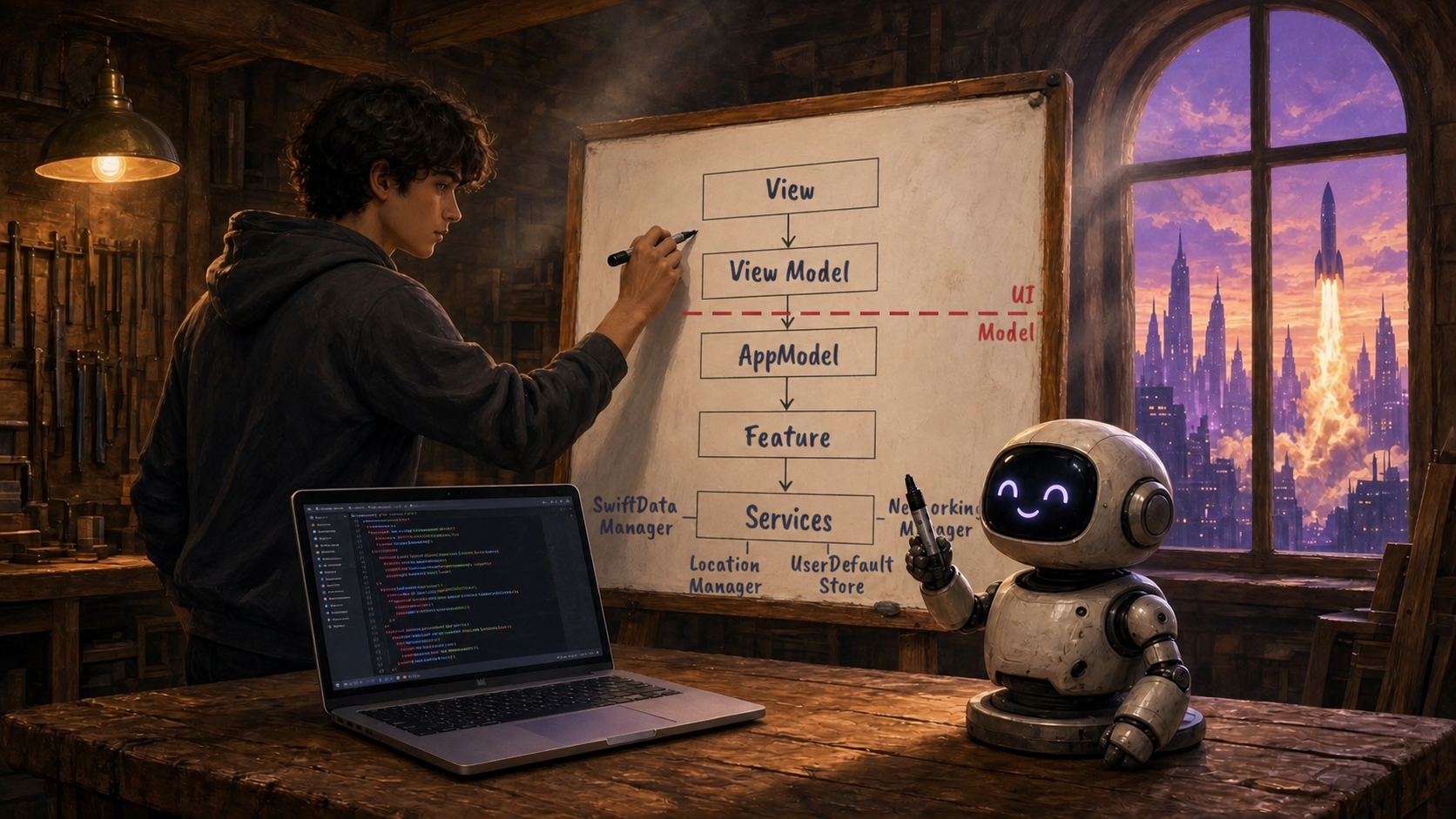
Start with the ownership overview. Then explain how a request moves through the feature.
02 · CFA ARCHITECTURE
Draw responsibilities before drawing arrows
Imagine a launch-tracking app. A reader opens its schedule, refreshes the next launch and saves a reminder. Give each box a sentence that describes what it owns.
- View: displays the schedule and forwards the reader’s actions. It owns layout, accessibility and visual presentation.
- ViewModel: prepares information for this screen and handles its presentation state. A selected row or an open sheet belongs here; the rules that decide which launch is next do not.
- AppModel: constructs and retains the application’s features and their dependencies. It provides a clear place to find the capabilities the app contains.
- Feature: owns a coherent capability, its authoritative state and its business rules. LaunchScheduleFeature decides which schedule results are accepted.
- Services and repositories: perform specific supporting work, such as fetching a schedule, persisting reminders or accessing location. A repository provides the boundary around data access.
“Services” is a broad label for this illustration. In the project, use specific names such as LaunchAPIClient and ReminderRepository so the reader knows what each dependency does.
Ask of every box: What decision belongs here—and which decision belongs somewhere else?
03 · CFA ARCHITECTURE
Separate ownership from the path of a request
01 · CONSTRUCTION & OWNERSHIP
AppModel
↓ constructs and retains
LaunchScheduleFeature
↓ uses injected dependencies
LaunchAPIClient · ScheduleRepository
02 · A USER REQUEST
ScheduleView
↓ reports intent
ScheduleViewModel
↓ calls a narrow feature API
LaunchScheduleFeature
↓ requests external data
LaunchAPIClient
AppModel supplies the feature dependency at construction. The request flows through the ViewModel to that feature; observable results inform the screen.
The whiteboard gives you a useful overview. To explain the implementation accurately, draw two small maps: one for construction and ownership, another for a user action.
AppModel assembles the features. A screen’s ViewModel receives the narrow feature capability it needs; it does not need the entire AppModel passed through every method. AppModel is not a mandatory forwarding step for each button tap.
A request then follows a short path: the View reports intent, the ViewModel calls a feature API, the feature applies its rules, and a repository or service performs the external work. Results return to their owner, and the screen observes or reads the state exposed for presentation.
Keep these arrows labelled. “Constructs”, “calls” and “observes” describe different relationships. An arrow without a label can accidentally suggest that object ownership, data flow and execution order are all the same thing.
04 · CFA ARCHITECTURE
Now explain what happens after Refresh
Use a real product decision: several screens can display the launch schedule, and a refresh should finish even if the screen that requested it disappears. Two requests arriving together should share the same refresh.
- The screen requests a refresh. Its ViewModel forwards that intent to the schedule feature.
- The feature decides whether work already exists. If a shared refresh is running, the new caller awaits it. Otherwise, the feature starts and retains the operation.
- The service fetches the schedule. The feature remains responsible for accepting the result and updating its state.
- The feature records the outcome. On failure, it can keep the last successful schedule and expose the error so the reader can retry.
- The interface reflects the outcome. The ViewModel exposes presentation information; the View draws loading, content or a retry action.
Here the shared refresh belongs to the feature because its useful lifetime extends beyond one screen. A screen-specific search may need a different policy: stop obsolete work and accept only the result for the current query.
Ownership follows the operation’s purpose and lifetime. Do not put every task in the UI, and do not hide every task in the model. Name the owner that can enforce the required behaviour.
05 · CFA ARCHITECTURE
Add the concurrency questions to your drawing
Boxes explain responsibilities. To explain concurrent behaviour, annotate them with four decisions: who starts the work, who can cancel it, who owns the state, and which result may update that state.
- Lifetime: Is this operation tied to a screen, a feature, a signed-in session or the whole application?
- Isolation: Which actor or other explicit mechanism protects the mutable state? A box labelled “Feature” does not answer that by itself.
- Overlap: If the operation is requested twice, do callers share it, queue it, or replace it? Write the policy beside the feature.
- Failure: What remains usable if the request fails? Who exposes the failure and who decides the retry behaviour?
Swift’s task model supports structured child tasks and unstructured tasks. Cancellation is cooperative: requesting it does not forcibly terminate arbitrary work. The architecture must still give meaningful operations an owner and an appropriate cancellation policy. See the Swift language guide on concurrency.
Neither a feature box nor an async function promises parallel execution. And an actor protecting state does not by itself decide which overlapping request should win. Those are additional questions your explanation should answer.
06 · CFA ARCHITECTURE
Give the two-minute interview explanation
Try explaining the launch schedule without starting with a list of frameworks:
“The schedule screen owns its presentation through a dedicated ViewModel. AppModel constructs the shared schedule feature and its data dependencies. The ViewModel requests a refresh through that feature’s API.
The feature owns the accepted schedule and the shared refresh operation. If another screen requests the same refresh, it waits for the existing operation. Closing one screen does not cancel work that the rest of the app still needs.
The API client retrieves the data. The feature records success or failure, and the screen presents that state. I would test overlapping requests and a failed refresh with previously loaded data.”
This is a proposed design for this scenario, not a claim about every launch app. Its strength is that each sentence can be checked against code or a test.
Expect a colleague to change one requirement: “What if users switch accounts during the refresh?” Your next step is to identify the owner of that session boundary and prevent an old session’s response from updating the new session. A useful diagram helps you locate that decision.
07 · CFA ARCHITECTURE
Use AI to challenge the explanation
Give your assistant one feature and ask it to trace the implementation. Let it help you find evidence, then read the relevant code yourself.
Using CFA for iOS, trace one user action from its View through its ViewModel to the owning Feature and data dependencies. Identify who owns shared state and each asynchronous operation. Explain duplicate requests, cancellation, stale results and failures. Cite the files and methods that establish each answer. Mark anything you cannot establish from the code. Do not change the project yet.
Compare that answer with your drawing. If your diagram says “the feature owns the data”, but several ViewModels hold independently editable copies, investigate the mismatch. If a method launches work and returns immediately, find out what its caller believes completion means.
A discarded task handle is a reason to ask about lifetime, not proof of bad architecture on its own. The important finding is the missing behavioural contract and the consequence it can cause.
The CFA AI Toolkit for iOS provides practical guidance for making these responsibilities visible in an iOS project. Use it to turn the discussion into a structure you and your assistant can follow.
08 · CFA ARCHITECTURE
Your turn: one feature, one page
👉 Pick an existing screen. Draw its View, ViewModel, owning Feature and dependencies. Put AppModel beside the features and label what it constructs. Then trace one action all the way to its outcome.
- Can you name the single authoritative owner of the shared data?
- Can you explain which state exists only for this screen?
- Can you identify who owns work that outlives the screen?
- Can you describe what a second request does while the first is running?
- Can you explain failure, retry and which results may be published?
- Can you point to a test for the behaviour you just described?
Leave unanswered questions visible. They give you a focused review task. Then ask a colleague to follow the diagram while you follow the source.
Can you draw your app’s architecture—and explain who owns each feature? When the drawing, the code and the behaviour tell the same story, your architecture becomes something the team can use.
FROM 3 DAYS OF SWIFT CONCURRENCY

CFA AI Toolkit for iOS
Make feature ownership and concurrent work easier to follow in your iOS app with Cooperative Feature Architecture.

ONLINE TRAINING FOR iOS DEVELOPERS
Build native iOS apps with AI.
Understand how they work.
Build in Xcode. Explore Swift Concurrency. Learn to direct AI with confidence.
Explore the training program →Explore the training days and lessons
 Next Launch